
On a customer's page you will see a card called Customer value on the right. It shows at a glance what the customer has brought in so far, and whether there is something you should keep an eye on, such as a failed payment.
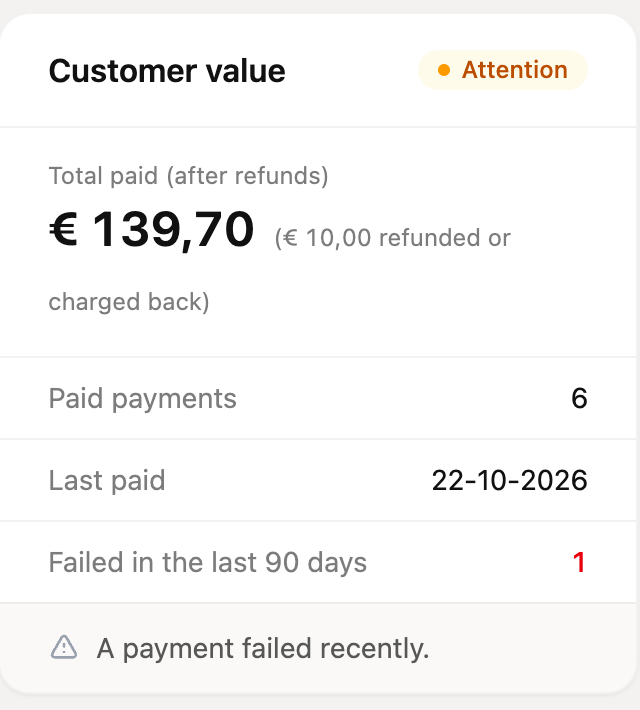
What does the card show?
- Total paid (after refunds): everything the customer has paid through Mollie, minus what has been refunded or charged back. If the customer paid in several currencies, you will see an amount per currency.
- Paid payments: the number of successful payments.
- Last paid: the date of the most recent successful payment.
- Failed in the last 90 days: the number of payments in the past 90 days that failed or were charged back. A payment that merely expired, because the customer did nothing with it, does not count as failed.
The data comes live from Mollie. That is why the card appears a moment after you open the customer page, and the figures are remembered for about 10 minutes. A payment that just came in may therefore take a few minutes to show up.
A customer's health
In the top right of the card you will see a label showing how the customer is doing. Below the figures, plain sentences explain why the customer has that label.
| Label | What it means |
|---|---|
| Healthy | No failed payments and no open follow-ups. |
| Attention | There are first signs: a follow-up is running, a payment failed recently, or a subscription is set to cancel. |
| Risk | Money is at stake: a follow-up failed (all attempts were made), a payment was charged back in the past year, or two or more payments failed in the past 90 days. |
| New | The customer has not paid anything yet, so there is nothing to rate. |
When there are several reasons, the most serious one is listed first and decides the label.
What can you do with it?
- If you see Risk or Attention, look at the reason given and act on it. For a running follow-up you do not need to do anything. For a failed follow-up you might call the customer, for example.
- Create a task so you or a colleague remember to follow up later, or let a workflow do that automatically. See the article about customer tasks.
- Want to see which emails the customer received from you? Open the options menu (the three dots) at the top right of the customer page and choose Sent e-mails. You will see the emails sent to this customer from RCUR in the past 30 days.
The label is a tool, not a verdict. A customer with Attention often just has a temporary problem, such as a balance that was slightly too low.
Why is the card empty for a customer?
Payments are fetched with the Mollie customer ID stored on the customer. If the customer is not linked to Mollie, or has not paid anything yet, you will see Nothing paid yet and the label New.