How can I setup pre-debit notifications?
For Advanced Subscriptions it is possible to enable pre-debit notifications. When enabled, RCUR will automatically send the customer an e-mail notification a couple of days before the recurring payment will be initiated at Mollie.
When creating or editing an Advanced Subscription, enable the “pre-debit notifications” feature
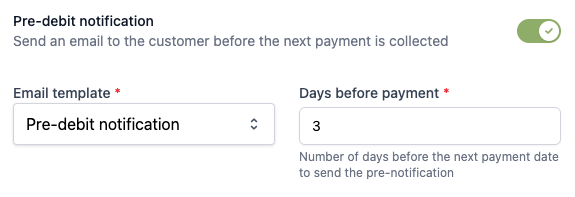
Select the desired e-mail template which we will use as notification. In case you don’t have one yet specifically for pre-debit notifications, you can create one via Templates. How can I create templates?
Fill in the desired “days before payment”. This will be the number of days before the payment will be created at Mollie.
Save the subscription and we now will automatically inform your customer about the upcoming charge.
The overview shows how many days before the payment the notification will be sent
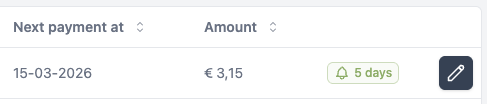
The next payment date is when we initiate the payment at Mollie. It typically takes 1 business day after that for the debit to appear on your customer's bank statement.